
Syncing records to your integrations
When an organization uses an accounting or CRM integration, such as Xero, QuickBooks, Sage, Unanet or Zoho CRM, Kompass sends records to it whenever they are saved. The page of each record shows whether that worked, and Sync now sends the record again without changing it.
This is available on client, contact, project, invoice, supplier and expense pages.
Check a record's sync status
At the top of the record, to the left of the Actions menu, a small icon shows how the last sync went:
- Green arrows: no integration reported an error on the record's last sync.
- Red warning triangle: the last sync to at least one integration failed.
- Gray arrows: the record has not been synced to any integration yet, or a sync is still waiting to run.
Hover over the icon to see each integration on its own line, with when the record was last synced (or Not synced yet, or Waiting to sync) and, if the last sync failed, the error message.
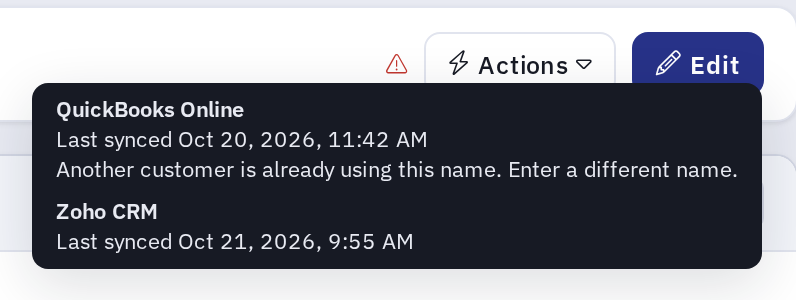
Only integrations that keep a sync status for this type of record are listed, and only when the record is actually sent to them. For example, an integration that receives projects only once they are accepted is not listed on a project that is still a quote. Some integrations keep no status for some record types (Sage 300 for clients, for example) and are not listed there, although they still receive the record when it is saved. When no integration is listed, the icon and Sync now are not shown.
Sync a record now
Use Sync now after fixing the cause of a failed sync, such as a missing account code in the accounting system, or when you want to make sure an integration has the record's latest details.
- Open the record.
- Open the Actions menu and choose Sync now.
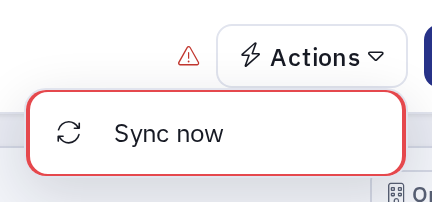
Kompass sends the record's current details to each integration, the same way it does when the record is saved, and shows Sync finished or Sync finished with errors. If a sync fails, hover over the status icon to see the message.
SugarCRM receives projects in the background. Kompass then shows Sync started. Some integrations update in the background. SugarCRM shows Waiting to sync until it finishes. The page checks for the result for about a minute; if it still shows Waiting to sync after that, reload the page.
Sync now also works on a locked record, since it does not change the record.
Sync now also notifies your webhook subscribers, including Zaps that use Kompass webhooks. They receive an update event for the record.
Who can sync a record
To use Sync now, a user needs permission to edit the record and the Can sync records to permission for at least one of the record's integrations, for example Can sync records to Xero. Kompass Admins have these permissions for every integration. To give them to another group, look in the Advanced section of the Integrations area when you change the group's permissions.
A user who may sync to some of a record's integrations but not others sends the record only to the ones they may sync. The others are still listed when you hover over the status icon, with the note You do not have permission to sync to this integration. Webhook subscribers are always notified, whichever integrations the user may sync.