
Webhooks
Overview
Webhooks let external systems receive real-time HTTP notifications when data changes in Kompass. For example, when a project is created, an invoice is updated, or a client is deleted. Use them to integrate Kompass with tools like Slack, Zapier, or your own services without polling the API.
Creating a webhook
Webhook subscriptions are managed in the Kompass Admin or via the public API.
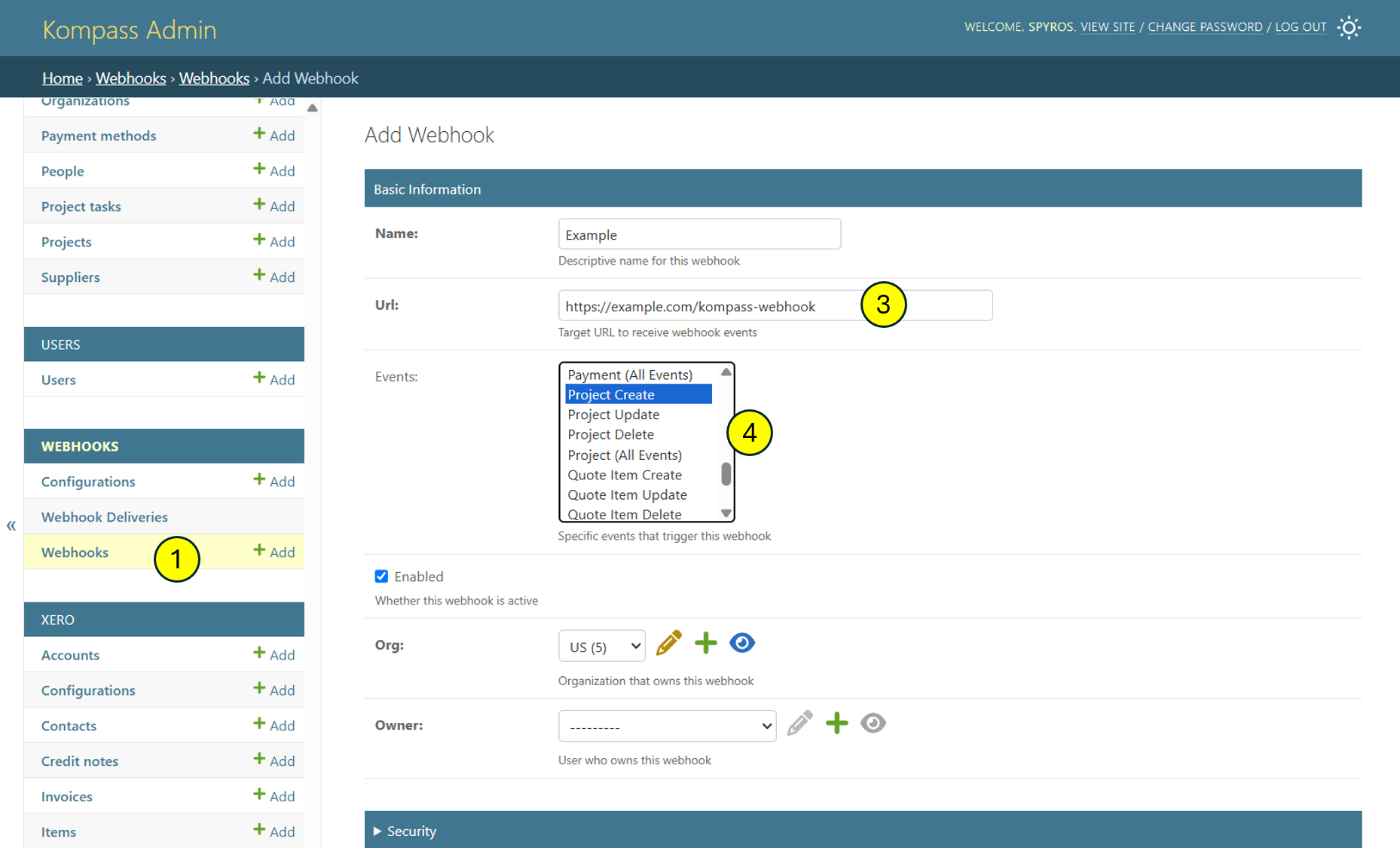
From the admin
- Open /admin/webhooks/webhook/.
- Click Add webhook.
- Set the Target URL, the HTTPS endpoint that should receive events.
- Tick the Events you want to subscribe to
- Save. Kompass generates a 64-character signing secret automatically; copy it now and store it with your integration.
From the API
POST /api/webhooks/
Authorization: Bearer <your-token>
Content-Type: application/json

{
  "target_url": "https://example.com/kompass-webhook",
  "events": ["project.create", "project.update", "invoice.*"]
}
Event types
Each event has the form resource.action . Resources currently include client , contact , invoice , and project . Actions are create , update , and delete . Use resource.* to subscribe to all actions on a resource, or * to subscribe to everything.
The synthetic event test.webhook is delivered by the Send test action and is useful for validating your endpoint without touching real data.
Delivery format
Every webhook delivery is an HTTPS POST request with the following headers:
Content-Type: application/jsonUser-Agent: Kompass-Webhook/1.0X-Webhook-Eventfor exampleproject.updateX-Webhook-Deliveryunique delivery IDX-Webhook-IDthe subscription IDX-Webhook-TimestampUnix timestamp in secondsX-Webhook-SignatureHMAC-SHA256 of the raw body, signed with your secret
The body is JSON with this shape:
{
  "id": "<delivery uuid>",
  "type": "project.update",
  "resource": "project",
  "action": "update",
  "created": "2026-05-18T10:23:11Z",
  "object": { ... full serialised project ... },
  "metadata": {
    "org_id": 7,
    "user_id": 42,
    "version": "26.5.15"
  }
}
Verifying the signature
Always verify X-Webhook-Signature before processing a delivery. Compute HMAC-SHA256 of the raw request body using your subscription secret and compare it to the header value (constant-time comparison).
Python example:
import hmac, hashlib

def verify(body_bytes, header, secret):
    expected = hmac.new(
        secret.encode(),
        body_bytes,
        hashlib.sha256,
    ).hexdigest()
    return hmac.compare_digest(expected, header)
Node.js example:
const crypto = require("crypto");

function verify(body, header, secret) {
  const expected = crypto
    .createHmac("sha256", secret)
    .update(body)
    .digest("hex");
  return crypto.timingSafeEqual(
    Buffer.from(expected),
    Buffer.from(header),
  );
}
Retries and reliability
- Success: any 2xx response code.
- Timeouts: 3 seconds to connect, 27 seconds to read.
- Retries: failed deliveries are retried with exponential backoff. After the final attempt the delivery is marked failed.
- Redirects: not followed. Your endpoint must return a 2xx directly.
- Rate limit: a maximum of 120 deliveries per rolling minute per organisation. Excess events are dropped, not queued.
- Deduplication: rapid edits to the same object within a short window are coalesced into a single delivery, so you may receive fewer events than there were database writes.
Testing your endpoint
From the webhook detail page in the admin (or via POST /api/webhooks/{id}/test/ ), click Send test. Kompass sends a test.webhook event to your URL using the same signing and headers as a real delivery.
Delivery history is available at GET /api/webhooks/{id}/deliveries/ and on the admin detail page. Each entry records the response code, timing, and any retry attempts.
Security
- Keep your signing secret confidential. Anyone with the secret can forge events.
- Always use HTTPS for the target URL.
- Verify
X-Webhook-Signatureon every request. - Compare the
X-Webhook-Timestampto the current time and reject very old deliveries (e.g. more than five minutes off) to prevent replay attacks.